Grinland Font: Elegant Script for Web Design
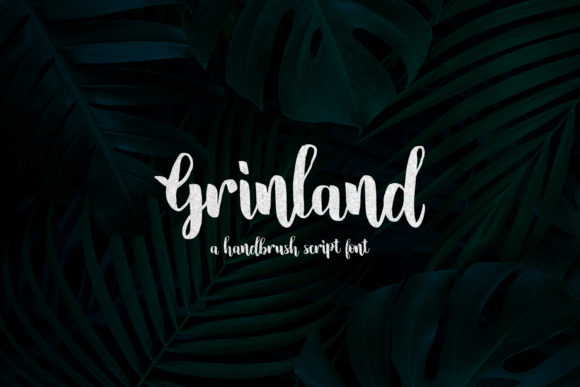
As a web designer, finding the right font can transform a layout from ordinary to extraordinary. Grinland is a brushed script font that brings a modern calligraphy feel to digital design. Its clean and genuine style makes it ideal for nature-related projects or outdoor themes. Whether you're working on a website, landing page, or app screen, Grinland offers a unique visual identity that stands out.
Grinland’s character is both elegant and approachable. The soft curves and flowing lines give it a handcrafted quality that feels personal and authentic. This font works well in digital spaces where a human touch is needed, such as brand logos, headers, or decorative elements. It adds a sense of warmth and creativity without overwhelming the design.
Using Grinland in Web Design
For web designers, Grinland is particularly effective in hero sections, call-to-action buttons, and headings. Its script style draws attention and creates a strong visual hierarchy. When used as a header, it sets the tone for the entire page, guiding users through the content with a natural flow.
In online stores, Grinland can be used for product banners or promotional text. It gives a boutique feel to the site, making it ideal for brands that want to emphasize craftsmanship or nature-inspired aesthetics. For coaching websites or course sales pages, Grinland adds a professional yet friendly touch that resonates with audiences.
When designing for mobile screens, it's important to consider how Grinland performs at smaller sizes. While it’s best suited for larger text, it can still work effectively on buttons or short phrases if used with proper spacing and contrast. On dark backgrounds, Grinland maintains clarity, but on light backgrounds, it may require subtle adjustments to ensure readability.
Grinland in Brand Identity and Digital Layouts
Brand identity relies heavily on typography, and Grinland provides a versatile option for creating a consistent look across digital platforms. It pairs well with sans serif fonts for body copy, allowing the script font to shine as a display type. This contrast enhances readability while maintaining visual interest.
For editorial designs, Grinland can be used in blog headers or section titles to add a touch of sophistication. In social media graphics, it helps create eye-catching visuals that align with a brand’s personality. When paired with a serif font, it can evoke a more traditional or literary feel, making it suitable for content-focused sites.
Grinland also works well in creative portfolios, where it can highlight project titles or artist names. Its handwritten quality adds a personal element that connects with viewers. For SaaS founders or digital product creators, using Grinland in landing pages can reinforce a brand’s creative and innovative image.
Practical Tips for Using Grinland
When incorporating Grinland into your design, keep the following in mind. Use it sparingly to avoid cluttering the layout. It’s best suited for short phrases, headlines, or logo text rather than long paragraphs. In responsive layouts, test how it looks on different screen sizes to ensure it remains legible and visually appealing.
On image overlays, Grinland can add a stylish touch without overpowering the background. For dark backgrounds, it retains its clarity, while on light backgrounds, it may need a slight shadow or contrast adjustment. Always test it in real-world scenarios to see how it performs across different devices and contexts.
Font pairing is essential for balancing Grinland’s decorative nature. Pairing it with a simple sans serif font like Open Sans or Lato ensures that the overall design remains clean and readable. This combination allows the script font to stand out while keeping the rest of the text easy to scan.
Commercial Licensing and File Formats
Before using Grinland in commercial projects, check the licensing terms. Most fonts allow use on websites, client projects, and online stores, but it’s important to confirm the specific rights. If you’re designing for a client, make sure the license covers their intended use to avoid any legal issues.
Grinland typically comes in multiple file formats, including OTF and TTF, which are compatible with most design software. For web use, check if a webfont version is available, such as WOFF or WOFF2, to ensure smooth performance across browsers. Some fonts also include alternate characters or ligatures, which can add variety to your designs.
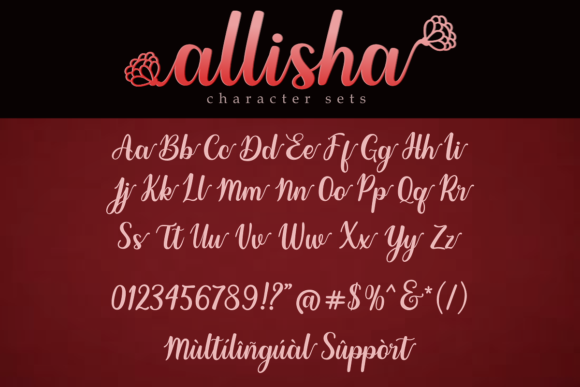
Support for multilingual content is another consideration. If your audience speaks multiple languages, verify that Grinland includes the necessary glyphs and characters. This ensures that your design remains consistent and professional across all regions and languages.
For digital product creators, Grinland can be part of a comprehensive design kit. Whether you’re building templates, UI kits, or brand assets, this font adds a refined touch that elevates the overall look. It’s a valuable addition to any designer’s toolkit, especially when working on projects that require a personal or artistic flair.
Grinland is more than just a font—it’s a tool for creating meaningful digital experiences. Its versatility, elegance, and readability make it an excellent choice for web designers looking to enhance their layouts with a touch of modern calligraphy. Whether you're designing a creative portfolio, an online store, or a branding campaign, Grinland offers the perfect balance of style and functionality.